Turn Your Phone Into a Hotspot Instantly
Share your internet with any device in seconds. Works even when your phone's built-in hotspot won't activate or is blocked by your carrier.
Everything You Need to Share Internet Seamlessly
Works When Others Fail
Bypass carrier restrictions and activate your hotspot even when your phone's native feature is blocked or broken. Get the tethering you already pay for without hassles or errors.
Three Ways to Share
Connect devices your way with WiFi, Bluetooth, or USB tethering options. Whether you need to share with your laptop, tablet, or another phone, you have the flexibility to choose what works best.
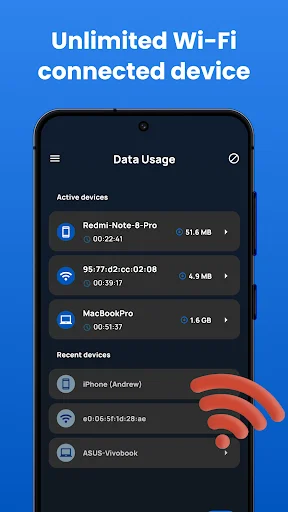
Track and Control Usage
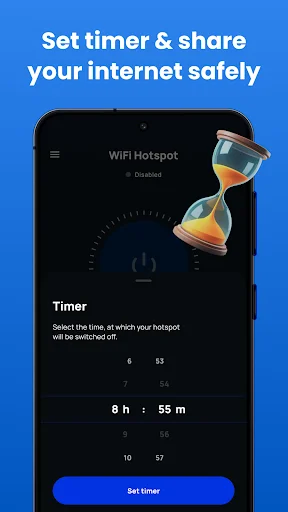
Monitor your data consumption, check hotspot speed, and set time or data limits by session, day, or month. Stay in complete control of your internet sharing with detailed usage insights.
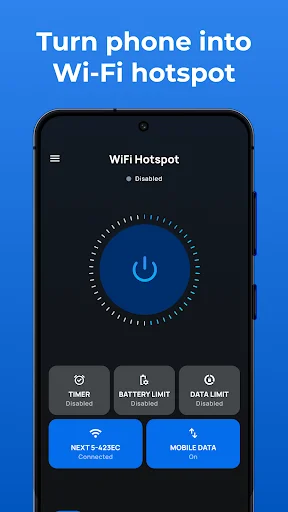
Simple One-Tap Setup
Start sharing internet in seconds with an easy-to-use interface. No technical knowledge or complicated settings required – just tap the button and you're connected.
About
The ultimate WiFi Hotspot Mobile App.
Hotspot tether at any time!
The portable WiFi hotspot helps you share your internet with other mobile devices and make your free hotspot. It is a simple & free WiFi hotspot app for android that you can use to share the internet with other devices. The personal hotspot app offers everything you need to share your free WiFi with your friends and family! ⭐
In just a few steps use your device as a personal Hotspot - Instantly turn your phone into a mobile hotspot with this no-root free WiFi hotspot app. Simple to use and easy to install, this hot spot app will transform your phone into a powerful mobile hotspot machine! With the personal hotspot app, you can track your internet usage, check the speed of the WiFi hotspot or place a timer on the mobile hotspot.💥
Amazing Personal hotspot features:
- 🤞 Hotspot widget ON/OFF the shared network data service for free WiFi hotspot and Bluetooth tethering interfaces.
- 🎯 Fix the hot spot data usage and time limits by session, day, and monthly period.
- 🌐 Share free wifi through a secure mobile hotspot and with point access.
- 📱 Sleek personal hotspot user interface compatible with all phone and tablet screens
- 🌟 Share your mobile data to other devices via a WiFi connection.
- 👌 This app lets you easily access free WiFi and hot spot settings.
- ⭐ The free hotspot provides you with usability for all data networks.
It takes seconds to set up a hotspot and share the internet.
The mobile hotspot is designed for the ultimate user experience, so you can quickly share your mobile data from your phone and set up your free hotspot. You need to select the network SSID name, choose if you desire to secure it with WPA2_PSK or if you want to keep the WiFi open, set the password, and lastly, insert the time limit you want your mobile hotspot to run for. Then the hot spot app will do it all automatically without disturbing you.
How to use the portable WiFi hotspot app:
- ✅ First, install the mobile hotspot and tethering app from the play store and open it. You will see an app home screen with multiple data, WiFi, hot spot, and turn-off time options.
- ✅ Select any option you want and share free unlimited data with our hot spot app.
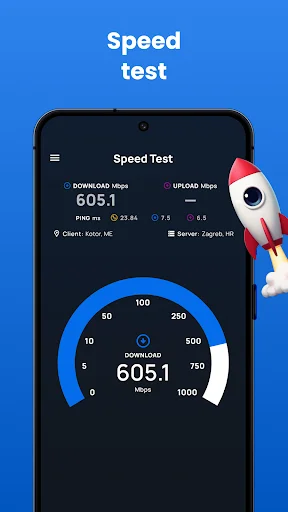
- ✅ Also, you can check the speed of your personal hotspot with the speed test option
- ✅ See your data usage details with all networks on the hot spot app
📱Share Internet data via Bluetooth📱
Start the personal hotspot app, long-press the hotspot button, and tap the Bluetooth tethering button. Now go to phone Bluetooth settings, pick the device you need to share the mobile data or free WiFi, and pair it with your device.
Share Internet data via USB.
Connect your device USB cable, join your laptop through a USB wire and open the app. Long press the hot spot button and tap the USB tethering. Your device is now sharing free WiFi over a USB hot spot.
Now feel free to download our WIFI hotspot app, create your free hotspots, and enjoy an unlimited data-sharing experience with this personal hotspot app!
Turn on the Portable Wi-Fi hotspot. Improve your mobile computing experience.
See How Easy Internet Sharing Can Be
Trusted by Over 5 Million Users Worldwide
For some reason, my Blu phone would NOT allow my hotspot to be turned on- no matter what I did or tried I got an error stating that my service plan didn't include hotspot, except, my plan has UNLIMITED hotspot!! My carrier tried and tried to help, the phone manufacturer was useless to fix the issue, but this app....THIS APP FIXED THE ISSUE BY MERELY BEING DOWNLOADED!! Literally. I downloaded the app, opened it, and pressed the button. VOILA!!! My phone's hotspot turned on and works like a dream!
Does exactly what I need it to do. This app is NOT free WiFi. Some phones are unable to or don't have an option to turn on their hotspot (tether). Meaning they can't share their data/internet with other devices. This app forces that toggle on without the phone's or the carriers' permission. My phone (OnePlus 11 5g) has a bug that says I need to subscribe to a service (that I already own) in order to tether. This app bypasses that. The only downside is the ads, but it's free so that's fine.
For some reason, every so often I couldn't get the hotspot on my phone to turn on. It goes out and stays out for weeks at a time and then occasionally starts working again a month later, and then works fine for a week or so... This has been an issue I've had with this phone ever since I got it. I have verified with my carrier that I DO have unlimited hotspot, so every time it didn't work I was extremely upset. I installed this app and the hotspot came right on and works great! 👍
Not sure why this doesn't work for some people but I've had nothing but positive experiences with it. Bypasses Verizon's check for tethering and even allows USB and Bluetooth tethering. Currently on a Z Flip 3. I think i may have seen an ad at most 3 times since ive had it installed.Used it with my pc,steam deck, other phones etc.
Fantastic! Exactly what I needed when my new used and unlocked phone wouldn't allow the hotspot feature to turn on- All I did was download this app, and press a button (axter x-ing out a few ads, of course...), and viola!! Hotspot = active!! Yessssss! Highly recommended!!
I don't know how you managed to pull this off. I didn't have hotspot on my plan, but needed it to migrate WeChat messages, otherwise was getting errors about not being on the same network. Phone's defaults didn't work. This app did. Beautiful.